
Artificial Intelligence (AI) is gradually transforming how businesses manage data, execute tasks, and integrate software systems. Rather than leveraging AI solely for information retrieval or content drafting, organizations are increasingly focused on applying AI directly within their operational workflows.
In Odoo 20, AI enhancements concentrate on enabling AI to perform in-system tasks, support voice interaction, and connect Odoo data with external AI tools. These updates open up new avenues for businesses to unlock data value and minimize manual effort.
So, what’s new with AI in Odoo 20? How do AI Agents, Voice commands, and MCP function? How can they support your business in real-world scenarios, and what critical factors should be considered during implementation? Let’s explore with NOS in the article below.
1. AI Agents in Odoo 20: From Answering Questions to Executing Tasks
One of the most notable AI highlights in Odoo 20 is the ability to support work execution through AI Agents.
While a standard AI tool primarily assists users with retrieving information or generating content, an AI Agent in Odoo can be configured to select and utilize available tools within the system to perform specific tasks. According to the Odoo 20 Release Notes, AI Agents can create records, update data, and participate in properly configured automated workflows.
1.1. How Do AI Agents Work in Odoo 20?
An AI Agent is an AI actor capable of receiving requests and utilizing configured tools to assist in executing specific tasks.
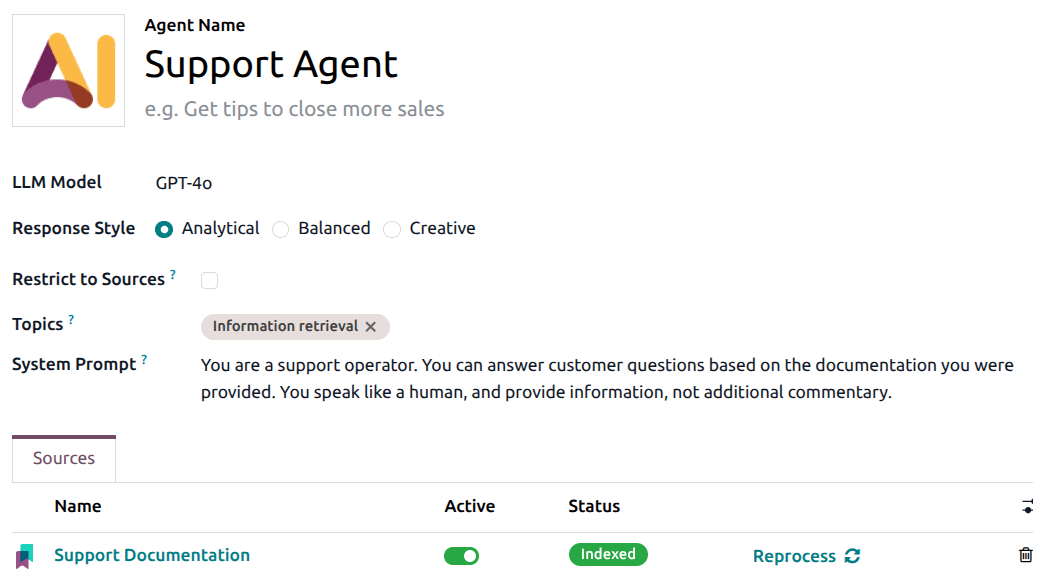
Upon receiving a request, the AI Agent can analyze the context, identify the appropriate tool, and utilize it to execute tasks within its defined scope. The result is then returned to the user or passed into the corresponding workflow.
For example, instead of manually opening individual files to search for information, users can ask the AI to assist in processing a dataset based on specific criteria. Depending on the configured tools and workflows, the AI can perform the appropriate actions rather than merely providing a text response.
Crucially, AI Agents do not automatically possess the authority to execute every task in Odoo. Their capabilities depend on provided instructions, assigned tools, business logic, and predefined system boundaries.
1.2. How Can Businesses Apply AI Agents to Their Operations?
For organizations managing operations on Odoo, AI Agents can be evaluated for tasks that follow clear workflows yet require contextual information processing.
Potential use cases include:
- Document Management: Assisting with content-based document classification, tagging, or routing files to appropriate locations when relevant tools are configured.
- Data Management: Assisting in creating or updating records upon request—such as customer profiles, sales opportunities, or other operational data the agent is authorized to manage.
- Workflow Automation: Combining AI with automated or scheduled actions to handle scenarios requiring contextual evaluation, rather than relying solely on fixed conditions.
For instance, a sales representative might need to update an opportunity record after a call with a client. With proper configuration, an AI Agent can assist in updating the relevant data fields based on given instructions. However, team members should still verify critical information before relying on it for subsequent decisions.
1.3. What Controls Should Businesses Put in Place for AI Agents?
The ability to execute tasks means AI Agents require tighter control than simple Q&A tools. An ambiguous request or an incomplete action setup could result in unintended data changes.
Before deploying AI into live operations, organizations should focus on three key considerations:
- Define operational scope: Clearly delineate what the AI is permitted to do, on which types of data, and under what conditions.
- Establish business rules: Enforce critical conditions—such as edit permissions, record statuses, or data validation—using robust system logic rather than relying solely on AI prompts.
- Test thoroughly before scaling: Conduct trials using sample data, monitor outputs, and flag scenarios that require human approval.
The goal is not to grant full decision-making power to AI, but to leverage AI to eliminate repetitive manual tasks within a controlled workflow.
2. Voice AI in Odoo 20: Interacting with the System via Speech
2.1. Voice Interaction: From Assigning Tasks to Meeting Transcriptions
In Odoo 20, voice input provides a more convenient way to interact with AI and document discussions. Users can issue spoken requests directly to the AI Agent instead of typing everything out. Additionally, Odoo AI's voice transcription features convert speech into text and automatically generate concise summaries.
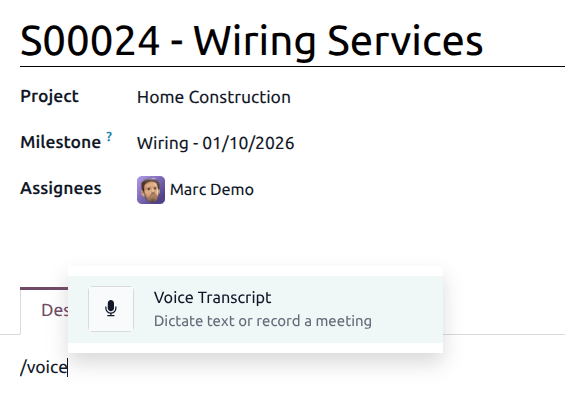
A notable highlight is the ability to record and process meeting content. Instead of manually taking notes while participating in a discussion, users can leverage Voice Transcript to generate accurate transcripts and AI-powered summaries. The summary can highlight key discussion points, decisions made, action items, and next steps.
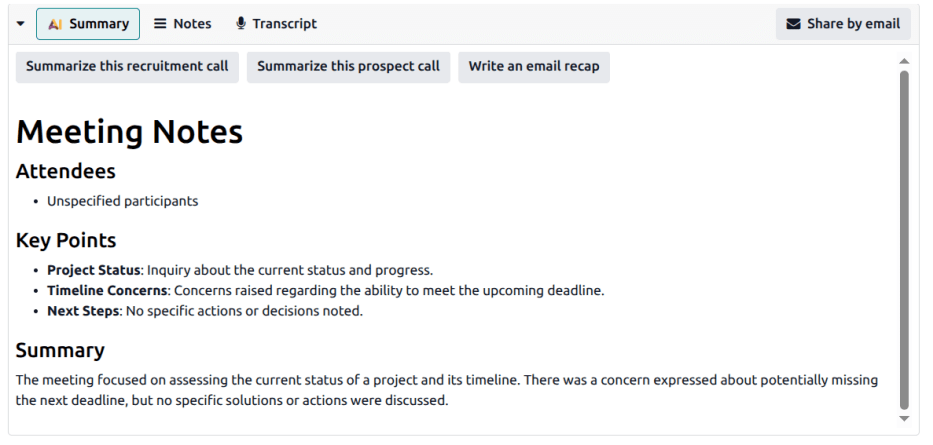
Users can create voice recordings within Description or Note fields across most business records, as well as in articles within the Knowledge application. Once processed, transcripts and summaries can be edited, supplemented with additional context, and shared via email.
2.2. What Value Does Voice AI Bring to Businesses?
Voice AI supports organizations in two primary ways: simplifying how requests are given to AI Agents and reducing the manual effort required for note-taking and summarizing discussions.
In daily operations, users can issue spoken requests for AI Agents to process within their configured tools and permission scope. For meetings or calls, transcripts and AI summaries enable team members to quickly review discussed topics, finalized decisions, and follow-up action items.
3. MCP in Odoo 20: Connecting Enterprise Data with External AI Tools
Beyond the native AI capabilities built into Odoo, organizations may need to leverage external AI tools to assist with data analysis or execute specialized tasks.
This is where MCP (Model Context Protocol) becomes particularly noteworthy.
3.1. What Is MCP and How Does It Work with Odoo?
MCP is an open standard protocol that enables Large Language Models (LLMs) to interact with external applications and access data via provided tools.
In Odoo 20, organizations can set up an Odoo MCP Server to connect their Odoo database with compatible external AI applications. Once the connection is configured, the external AI can utilize authorized tools to read or modify data within Odoo.
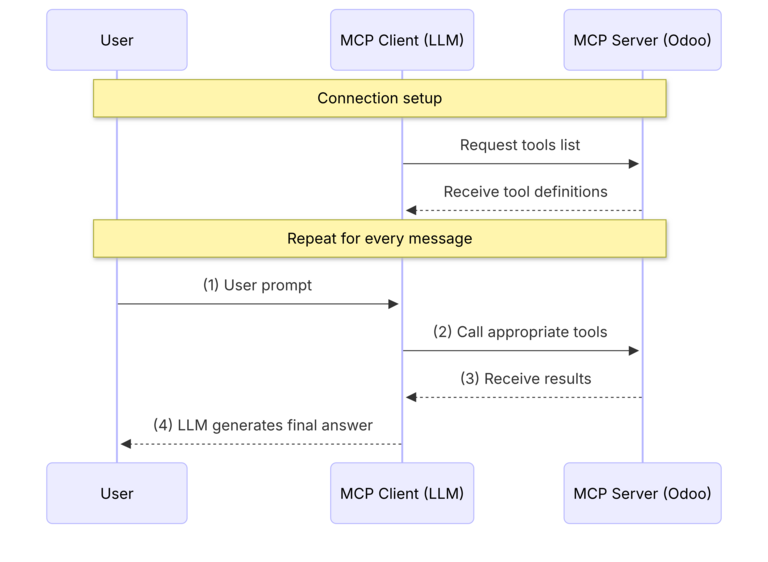
This process can be visualized in three steps:
- Connect: Configure a compatible AI tool, server information, and authentication credentials to connect with the Odoo database.
- Submit Request: The user submits a request using natural language via the external AI tool.
- Execute & Deliver: The AI tool calls authorized functions, receives the returned data, and presents the results to the user.
For example, a business may want to use an external AI application to query operational data in Odoo. Rather than building a custom integration pipeline for every request, MCP provides a standardized connection protocol, enabling compatible AI tools to interact with publicly exposed system functions.
3.2. Security Considerations for MCP Connections
While MCP enables AI tools to interact with enterprise data, it also makes access control a critical requirement.
According to Odoo 20 documentation on the MCP Server, system administrators can select which server actions are exposed via MCP. Specific tools can be set to read-only to restrict data modification capabilities through that interface.
Organizations should only expose essential tools, clearly segregate read access from create/update permissions, and strictly secure authentication keys. For active production systems, initial testing should be conducted within a limited scope prior to expanding connectivity. For companies handling customer information, financial records, or sensitive internal data, adopting AI connections must be paired with appropriate security policies and data governance.
4. AI Costs in Odoo 20: What Businesses Need to Know About IAP Credits
Alongside operational value, cost is a fundamental factor businesses must weigh when integrating AI into daily operations.
According to the Odoo 20 Release Notes, AI features consume credits purchased through In-App Purchases (IAP). Consequently, businesses should evaluate expected usage volume and budget constraints rather than assuming all AI capabilities are unlimited within their existing software licensing fees.
What Are IAP Credits?
IAP is the built-in mechanism for purchasing supplementary services within the Odoo ecosystem. In Odoo 20, credits are consumed for AI features according to current version policies.
When budgeting, businesses should account for the following cost components:
- Odoo licensing cost: Based on the subscribed plan and service scope.
- AI credits expense: Based on feature policies and actual AI consumption levels.
- Implementation & integration costs: Potential expenses incurred when configuring workflows or connecting external tools.
- External AI service fees: Expenses to be audited separately if utilizing third-party services with independent pricing models.
Specific cost structures should be verified against active policies, plan tiers, and implementation strategy. Budgets should not be estimated solely based on user headcount or the number of enabled features.
Conclusion
Odoo 20 introduces compelling avenues for AI application through AI Agents, Voice integration, and MCP. From executing automated tasks and transcribing meetings to connecting with external AI platforms, each feature serves a distinct operational purpose and warrants evaluation against real-world requirements.
Ultimately, practical value depends on more than technology alone. Data quality, workflow design, access control, cost structures, and governance all dictate implementation success. If your organization is exploring AI capabilities in Odoo 20, NOS is ready to partner with you - evaluating functional requirements, defining suitable workflows, and tailoring an implementation strategy aligned with your actual operations. Rather than attempting to deploy every new feature at once, begin with a clearly defined problem where results can be measured.
Empowering Business Management with AI Solutions
Contact NOS today for an optimized solution tailored to your business!